Skip to content
ONIWC
Website builder

A complete website, made for your business.

Tell us what kind of business you run and choose a design. ONIWC builds every page for you, with the text, photos and menus already in place. Then you make it look exactly the way you want.

app.oniwc.com / onboarding

Step 2 of 4 · Business category

What kind of restaurant is it?

CafeFine DiningFast FoodBakeryPizzaCloud KitchenBar & LoungeIndian RestaurantChinese Restaurant
Continue
How it works

From sign-up to running your business

Made for owners of shops, restaurants, clinics, agencies and creative businesses who need a proper website without spending weeks picking templates, writing text and setting up a shop. Agencies can run several client sites from one account too.

  1. 1. Tell us about your business

    Available

    Create your account and answer a few quick questions. We only ask what makes a difference to your website.

    • Your business name
    • What kind of website you need
    • Go back and change any answer before your site is built
  2. 2. Choose your type of business

    Available

    Pick from 67 types of business. This decides which pages you get and what they say, so a law firm and a bakery never end up with the same website in different colours.

    • Pages and sections that fit your business
    • Wording that sounds like your trade
    • Photos chosen for your type of business
  3. 3. Pick a design

    Available

    Choose a design style, then a theme. You see each one as a real website for your type of business that you can scroll through, so there are no surprises.

    • Design styles set the overall look and layout
    • Themes set the fonts, colours and inner pages
    • Switch themes later without losing your content
  4. 4. Add your brand

    Available

    The Brand Kit puts your identity on the site, with a live preview of your real website next to every setting.

    • Logo, favicon and site name
    • Pick one colour and get a full matching palette
    • Google Fonts or fonts you upload yourself
    • Styles for buttons, cards, forms and icons
  5. 5. We build your website

    Available

    ONIWC creates every page at once, with menus, header and footer, text and images. For online stores that includes product categories, products, prices and discount codes, all ready for you to edit.

    • Your whole website in under a minute
    • Pages, menus, photos and contact details filled in
    • Every word and picture is yours to change
  6. 6. Edit anything

    Beta

    Change your website by clicking on it in the Design Studio, and manage your pages, menus, photos and videos alongside it.

    • Click anything on a page to restyle, move or layer it
    • Add elements, animations and things visitors can click
    • Adjust the layout separately for computer, tablet and phone
    • A media library for your own photos and videos
  7. 7. Connect your domain

    Available

    Every business gets its own <name>.oniwc.com address. From the Starter plan you can also connect a domain you own, and we check its settings are right before sending visitors to it.

    • An oniwc.com address for every business
    • Clear instructions for the records to add at your domain provider
    • A simple status: pending, needs fixing, or verified
  8. 8. Publish and run your business

    Available

    Publish when you’re ready, take your site offline without deleting anything, and handle the day-to-day from the same dashboard.

    • Pages ready for search engines, with titles and descriptions you can edit
    • Store tools for products, stock, orders, refunds, customers, discounts and reviews
    • Connect online payments, Shiprocket delivery and your email service
    • Visitor stats and marketing tools for each business
Types of website

7 types of website, 67 kinds of business

The type of website decides what your site can do. Your kind of business decides what it says.

Online Store

Sell online with a full product catalogue, shopping cart, checkout and customer accounts.

  • Search, filters and sorting so shoppers find things quickly
  • Product pages with photos, options like size or colour, and reviews
  • Cart, checkout and order confirmation
  • Customer accounts with their order history
  • Manage products, orders, stock and discounts from your dashboard

13 business types

  • Fashion
  • Clothing
  • Shoes
  • Bags
  • Jewelry
  • Beauty
  • Electronics
  • Furniture
  • Home Decor
  • Books
  • Sports
  • Pet Supplies
  • Food & Grocery

Restaurant

Show your menu, opening hours and location, and take table bookings and online orders.

  • Menu pages written for your kind of food
  • Opening hours, location and contact details
  • Table bookings and online orders for delivery or pickup
  • Photos picked to suit your style of restaurant

11 business types

  • Cafe
  • Fine Dining
  • Fast Food
  • Bakery
  • Pizza
  • Cloud Kitchen
  • Bar & Lounge
  • Indian Restaurant
  • Chinese Restaurant
  • Japanese Restaurant
  • Dessert Shop

Business

A professional website for your company: what you do, the work you’ve done, your team and an easy way to get in touch.

  • Service pages and case studies
  • About, team and contact pages
  • Enquiry forms that send new leads to your dashboard
  • Pages planned around your industry

14 business types

  • Agency
  • Consulting
  • Marketing
  • Software / SaaS
  • Law Firm
  • Real Estate
  • Finance
  • Construction
  • Architecture
  • Education
  • Manufacturing
  • Logistics
  • Hotel & Resort
  • Travel

Clinic

Tell patients what you treat, introduce your team, and let people request an appointment online.

  • Pages for your treatments and specialties
  • Profiles for your doctors and practitioners
  • Appointment request forms
  • Helpful information pages for patients

9 business types

  • Dental Clinic
  • Eye Clinic
  • Dermatology & Skin
  • Physiotherapy
  • Orthopedic Clinic
  • Pediatric Clinic
  • Women's Health
  • General Practice
  • Veterinary Clinic

Creator

One home for your work, your story and the things you offer your audience.

  • A portfolio or showcase for your work
  • An about page that tells your story
  • Your offers, bookings or links in one place
  • A contact form and newsletter sign-up

9 business types

  • Personal Brand
  • Photographer
  • Designer
  • Artist
  • YouTuber
  • Streamer
  • Musician
  • Coach
  • Writer

Community

Run a members’ community, a fan club or a members-only content site.

  • Member sign-up and profiles
  • Posts written by your members
  • Content that only members can see
  • Tools to moderate what gets posted

7 business types

  • Membership Community
  • Fan Club
  • Exclusive Content
  • Creator Membership
  • Learning Community
  • Gaming Community
  • Club / Association

Dating & Matchmaking

Run a matrimony, matchmaking or dating service built around member profiles.

  • Member profiles members can browse
  • Interests and matches
  • A private members’ area, separate from your public site
  • Privacy controls for members

4 business types

  • Matrimony
  • Marriage Bureau
  • Dating Platform
  • Matchmaking Service
After you pick a design

The design is just where you start.

Once your site is created, all of it is yours to change: your logo and colours, your pages, the words, the photos and even how things move. And you can keep changing it after it’s live.

  1. 1Pick a designStart with a professional website made for your type of business.
  2. 2Make it yoursChange your branding, pages, sections, text, layout and animations.
  3. 3PublishGo live on your ONIWC web address or your own domain.
  4. 4Keep improvingChange things whenever you like. Nothing goes live until you press Publish.

Everything about your website on one screen

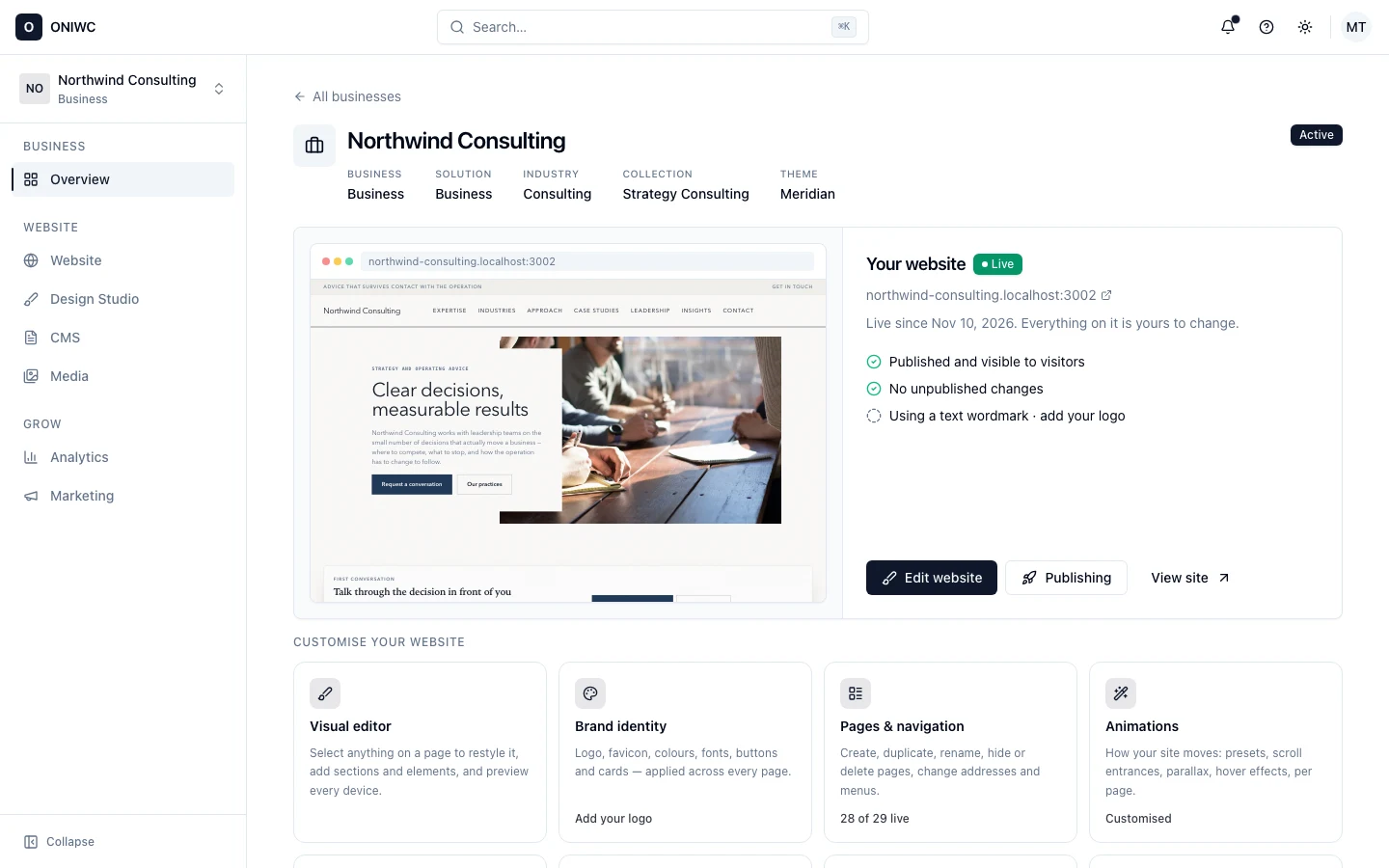
Open your business and the first thing you see is your website as visitors see it: whether it’s live, which changes are still waiting to go out, and a quick way into every part of it.

  • A live preview of your homepage and its web address
  • A clear view of the changes you haven’t published yet
  • Your logo, favicon, domain and new enquiries at a glance
  • Only the tools your type of business actually needs

Real screenshots from the ONIWC dashboard, taken while editing a consulting firm’s website.

ONIWC dashboard · Overview
Control center: Everything about your website on one screen
Selling online

An online store that really takes orders

An Online Store site works as a shop from the start. Shoppers can browse, pay and check their orders, and you manage everything from your dashboard.

  • Products with sizes, colours, details and brands
  • Stock that goes down when orders come in
  • A slide-out cart, checkout and order confirmation
  • Razorpay, Stripe, PayPal, Cashfree or cash on delivery
  • Delivery by PIN code area, store pickup or Shiprocket
  • Reviews only from people who actually bought
  • Discounts on chosen products or collections
  • Customer accounts for each store

Coming later

These aren’t available yet. We list them so you can plan ahead.

  • AI-written website textDescribe your business in a few words and have your page text rewritten to match.Planned
  • More than one domain per businessFor example, yourshop.com and yourshop.in both showing the same site.Planned
  • Changing your oniwc.com addressWe want links you’ve already shared to keep working first.Planned
Your site starts with photos picked for your type of business. Swap any of them for your own from the media library.

Create your website today

Every business gets its own oniwc.com address. Plans start at $5 a month (₹299 in India), and you can connect your own domain from the Starter plan.